Marriage Records in Greenville County can be accessed quickly through the official online portal, where users enter the spouses’ names, marriage date, or record number to retrieve a certified copy. The system indexes recorded marriages, historical archives, and amended entries, making it easy to locate a marriage certificate or license for legal, genealogical, or personal needs. Turnaround time is usually within a few business days.
Marriage Records requests in Greenville County require a simple form, a valid photo ID, and the applicable fee paid by cash or card. Once submitted in person or by mail, staff verify the spouse’s identity, correct any clerical errors, and issue either a certified marriage record or an informational copy. Certified copies are accepted by courts, insurers, and government agencies, while informational copies help with family‑history research.
How to Search Marriage Records
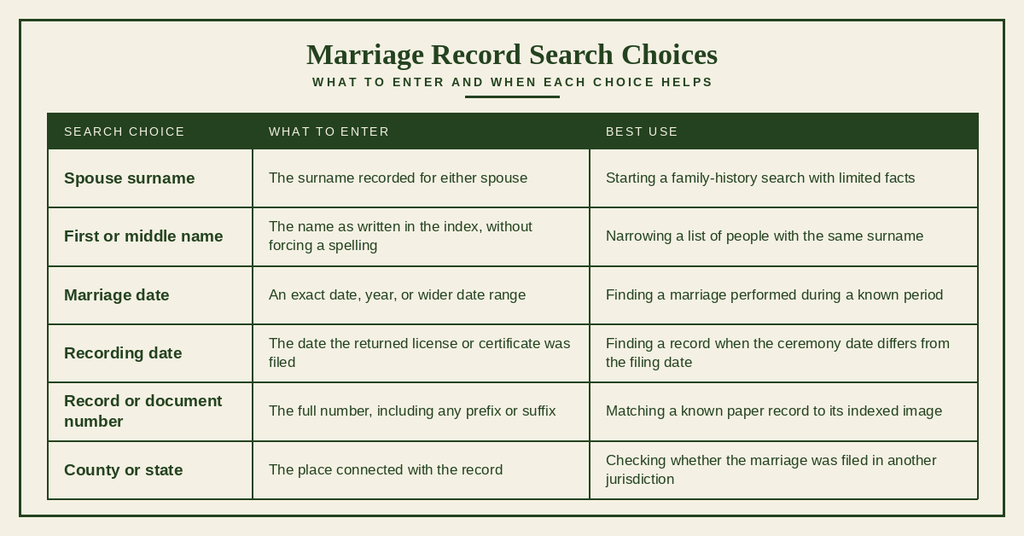
Greenville County marriage records search starts with the county’s official public index. This section shows how to search by spouse name, marriage date, recording date, or record number, then check each result before requesting a copy. You can also consult bench warrants to locate official filings. The index helps locate a filed marriage, but record age, requester status, and copy type can affect what the county can release. A broad first search often works better than a narrow search built on one spelling.
Official Search Portal: https://www2.greenvillecounty.org/scjd/publicindex/
Steps to Search
- Open the official Greenville County public records portal and select the marriage category from the record-type menu. Some searches begin on a general public index page, while others open a form with separate links for deeds, court cases, and marriages.
- Enter the surname of one spouse. Begin with the legal surname used at the time of the marriage, since a birth surname, married surname, suffix, or spelling variation may produce a different index entry.
- Add a first name or middle name only when you know how it was recorded. A surname-only search often produces a manageable list, and the source image can then be used to compare the full names.
- Enter the marriage date or a date range when known. If the exact date is uncertain, widen the range by several years rather than relying on one day.
- Use the recording date as a separate search choice when the portal provides that field. The date on the license or certificate may differ from the date the county received or indexed the returned document.
- Enter the record or document number if it appears on a paper copy, family document, or earlier search result. This can lead directly to the correct entry and reduce false matches caused by common names.
- Review each result by comparing both spouse names, the marriage date, the recording date, and the record number. Check the county because a ceremony and the filing of its recorded marriage can involve different places.
- Choose the copy type shown on the result page, complete the request fields, and review the fee, delivery method, and processing statement before payment. Recent records or requests made by someone other than a spouse may require an eligibility document.
- Save the confirmation page or receipt after placing the order. Once a copy arrives, check every name, date, number, seal, and signature before sending it to a court, agency, insurer, or other recipient.
Name, Date, and Record Number Searches
The best search field depends on what you already know. A surname plus a broad year range works well for family research, while a record number gives the cleanest match when it comes from a document or earlier index entry.
Reading a Marriage Search Result
A result may list the spouses’ names, marriage date, recording date, county, record number, and officiant. Older entries can also include witnesses or a book and page reference, though not every field appears in every collection. The indexed entry can point to an index card, a scanned document, or a full certificate image, so the preview should be checked for the actual source details. A result with matching names still needs a date and location comparison before it can serve as proof of the marriage.
Types of Marriage Records
Marriage records fall into different categories based on the event they document, the age of the source, its storage status, or a later official change. Knowing those differences helps you choose the right search and decide whether a plain research copy or a certified copy is needed.
Recorded Marriage Records
A recorded marriage documents a ceremony that took place and was returned to the recording office. A marriage license is permission to marry, while the recorded marriage or marriage certificate is the later proof that the ceremony was completed and filed. The two documents may carry different dates, signatures, and identifiers, which can affect search and verification.
Marriage Record Indexes
A marriage record index is a finding tool rather than the full legal document. It may list names alphabetically, group entries by year, or provide searchable fields for a county system. The entry can reveal a book, page, certificate, or document number that leads to the source image. An index typo can also make a valid marriage appear to be missing.
Historical Marriage Records
Historical marriage records were created under older recording practices and may appear on handwritten certificates, bound registers, index cards, or microfilm. Names can be abbreviated, dates may use different formats, and some entries may omit a field that appears on modern records. The source collection and record date should be recorded with any search result used in family research.
Amended Marriage Records
An amended marriage record carries an official change approved after the original filing. The amendment may appear as a notation, a corrected image, or a later entry linked to the same record number. It does not always mean that a second marriage occurred. Reviewing the original entry and its amendment together can prevent confusion about names, dates, or the status of the document.
Archived Marriage Records
An archived marriage record has been preserved in a collection that may sit outside the county’s active working files. Historical age and archival storage are separate ideas: an old record may remain in county custody, while a newer record may eventually move to a state collection. Public viewing rules still apply to the records in each collection.
Marriage, License, and Other Records
Each record answers a different question. A license shows that the legal steps to marry began, a recorded marriage shows that the ceremony was completed, and a later decree records the end of a marriage through divorce.
Certified Marriage Records
A certified marriage record is issued through the authority that holds the filed marriage record. Certification confirms that the document is an official copy from that source. The county may offer different copy choices, so compare the selected option with the recipient’s requirements before ordering.
Certified Copies
A certified copy carries an official certification statement and a seal, signature, or other mark used by the issuing custodian. It is the proper choice for legal filings, official requests, and agencies that require proof rather than a research image. The copy reflects the record as certified at the time of issuance, including any notation showing that an amendment was made.
Plain and Noncertified Copies
A plain or noncertified copy reproduces the record without the custodian’s certification. Such a copy can support family-history research, private review, and preliminary applications. A court, insurer, or government office may reject it when that office requires a certified marriage certificate. The portal’s copy description should be read closely because a scanned image and a plain copy are not the same product.
Uses of Certified Records
Certified marriage records are commonly requested for court matters, insurance claims, government services, benefit claims, property matters, and settlement files. The requesting organization controls its own rules, so a certificate accepted by one office may not meet another office’s document standard.
- Check the exact wording of the request before choosing a copy type.
- Confirm whether the recipient needs a certified copy, a plain copy, or a copy with a particular filing date.
- Read every field on the received document before mailing or presenting it.
- Ask the receiving office whether it returns documents after processing.
Record Authentication
Authentication starts with the issuing authority, record number, names, and dates. A certification mark verifies that the copy came from the record custodian; it does not replace checking whether the indexed entry matches the family facts you are researching.
- Compare the certificate or record number on the copy with the search result and receipt.
- Compare both spouse names, including middle names, suffixes, and any amended name.
- Check the ceremony date against the source image and note the recording date separately.
- Look for the issuing office, certification statement, seal, signature, and issue date required by the recipient.
- Report a mismatch to the county before sending the document when the source image and certified copy differ.
Certificate Delivery
Delivery may be available through an online order, mail request, or in-person pickup, depending on the record and office procedure. Online confirmation can show the current fee and chosen delivery method. For a mail request, follow the office form for signatures, payment, identification, and return mailing; do not send original identity papers unless the office asks for them.
Recent-record requests and requests made by a parent, legal representative, or other eligible person can require proof of identity, a signed authorization, or a court order. Processing time varies with the copy type, request method, record age, archive retrieval, and any correction work. Ask the office for the expected time when the checkout page does not state one, and keep the order confirmation until the copy arrives.
Historical Marriage Records and Genealogy
Historical marriage records can fill gaps left by censuses, obituaries, and family Bibles. The key is to treat the index as a path to a source and the source as the item to cite. Greenville County records and the older collections held by the South Carolina Department of Archives and History may cover different periods and may need to be searched together.
Older Marriage Records
Older records may use handwritten names, abbreviated given names, changed place names, or a year that differs from the family’s remembered date. Bound books and handwritten certificates can also place an event under a surname used at a different time. Researchers should compare the document with a full marriage image rather than relying on a typed index entry alone.
Marriage Indexes for Genealogy
A genealogy index works best when used as a map. Record the surname, given name, date, county, collection, book or certificate number, and page for every candidate. If an index lacks a first name, search the year and county with the surname, then inspect each source image. A documented false match is still useful because it prevents repeated work.
Archived Record Collections
An archived collection may require a collection name, date range, book, roll, or box reference rather than a county address alone. The South Carolina Department of Archives and History holds historical marriage material that may support research beyond the county’s most active records. Requests to a state archive can involve its own reading rules, copy charges, and handling procedures.
Digitized Records
A digitized marriage record can include a scanned certificate, an index card, or both. Image quality can affect faint handwriting, seals, and marginal notes, and a file can be incomplete. Save the image reference, collection title, document number, page, and date so the source can be cited again. A scan helps research, but a recipient who needs an official certified copy must use the process for that product.
Family History Research
Marriage records can connect surnames, children, siblings, witnesses, and officiants to other records. You can also explore public records through available county records. The strongest family conclusion comes from matching the marriage source with a census, birth record, obituary, or probate file. Keep confirmed facts separate from possibilities until the source images agree.
A Practical Research Sequence
Work from the least detailed fact to the strongest match. This sequence reduces false leads and leaves a clean record of what each source proves.
- Write every surname and given-name form that the family used during the likely marriage years.
- Search the county index by one spouse and a broad year range before adding restrictive fields.
- Open each candidate image and compare the names, date, county, and officiant with the family facts.
- Save the permanent identifiers, such as a book, page, certificate, or document number.
- Check state archives, newspapers, family Bibles, and probate files for records not carried into the county index.
- Order a certified copy only when a recipient requires legal proof or the family file needs an official source copy.
Marriage Record Corrections
A correction changes or clarifies information in the official marriage record. The Clerk of Court reviews the source and supporting proof before approving a change. A private family tree, a search-site entry, or an online index cannot be edited by the researcher, so report suspected errors to the county.
Incorrect Spouse Information
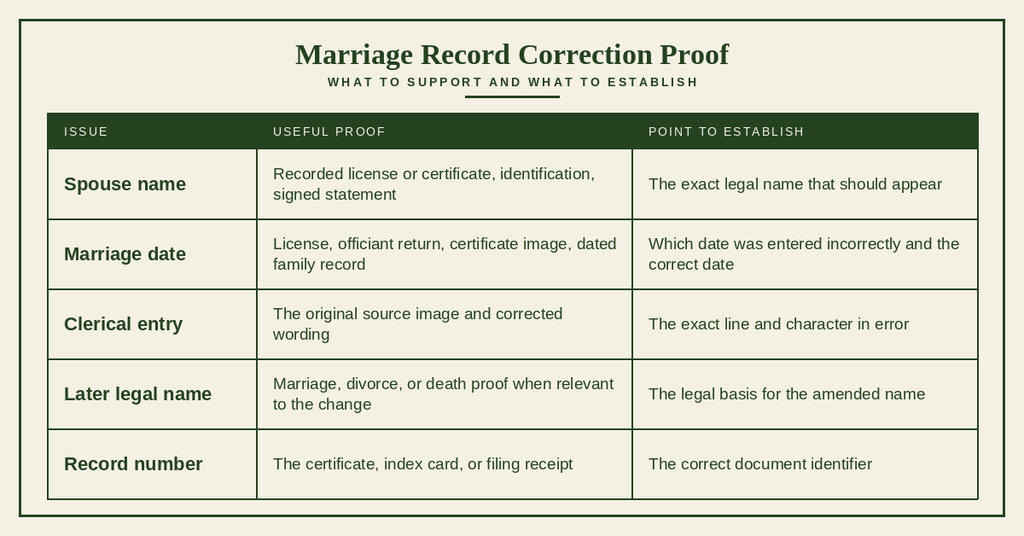
A name error may involve a misspelled surname, an omitted given name, an incorrect suffix, or a name recorded under an alias. Compare the certificate image with the marriage license and other documents that show the spouses’ legal names. A correction should address the exact text at issue rather than replacing a correct name with another unverified version.
Incorrect Marriage Date
A disputed date can come from confusing the ceremony date with the date the record was returned. The license, officiant’s return, and certificate may each supply a relevant date. The person requesting a change should identify which date is wrong and provide evidence for the corrected value. The county must decide whether the source can be amended.
Clerical Errors
A clerical error is a recording or transcription mistake, such as a misspelled first name, transposed number, omitted character, or copied date. The source image and the indexed entry should be compared to show where the difference begins. An index error can be corrected separately from an error found in the filed document.
Supporting Documentation
The office can require different proof depending on the error. Send only the records named on its correction form, and keep copies of everything sent.
Amended Record
An approved amendment may be shown as a notation, a corrected image, or a separate entry tied to the original record number. The original event and its filing history remain part of the record history. Once the county completes the change, request a new certified copy if an older copy contains the disputed text.
Marriage Record Accuracy and Verification
Accurate research depends on checking what each source actually says. Names, dates, and numbers can each contain errors, and the source image may differ from the searchable entry. A careful verification process keeps those layers separate.
Confirming Spouse Identity
Compare the complete names on the marriage image with evidence from another source. Pay attention to middle names, suffixes, and names recorded in shortened form. A matching surname and year do not confirm identity by themselves; the given names and location should fit the family’s timeline.
Verifying the Marriage Date
Write down the ceremony date and the recording date as separate facts. A certificate, license return, newspaper notice, family Bible, or church record can show which date each source reports. If they conflict, preserve the difference in your notes rather than choosing one value without a reason.
Checking Record Numbers
Transcribe the full record or document number, including prefixes, zeros, and suffixes. Some results display more than one identifier, such as an index number and a certificate number. Compare the identifier on the source image, search result, order confirmation, and certified copy before using the document in a filing.
Name Variations
Surname changes can come from marriage, adoption, census conventions, or an index spelling. Search one spouse at a time and try the legal forms tied to the relevant years. First names may appear as initials, nicknames, or different spellings, so a shortened surname search can produce better candidates than a fully reconstructed name.
Index Errors
An index error affects the search entry, while a source error affects the filed document. Missing names, reversed surnames, incorrect dates, and repeated entries are possible index problems. Two results may also point to the same record through an original entry and an amendment, so compare the document number and source image before treating them as separate marriages.
Official Record Verification
Official verification means checking the record with the office that holds it or receiving a copy certified by that office. For legal use, request a current certified copy and compare its identifiers with the research image. For family use, save the source image, search terms, date searched, and citation notes so the finding can be repeated.
Marriage Record Search Problems
A missing result does not always mean the marriage was never recorded. Names, dates, county boundaries, digitization, release rules, and filing delays can each affect a search. Work through one possible cause at a time and record what each change produces.
Record Not Found
Remove filters one at a time, search by surname alone, and widen the date range. Try the recording date if the ceremony date produced nothing. A common surname may require a narrower year range after that wider search, while an uncommon surname may work with a broad period and several given-name forms.
Name Does Not Match
Search each spouse separately using the surname and given name recorded at the time. Remove titles, middle initials, and suffixes that may not appear in the index. If the family’s name changed later, search the earlier legal surname as well as the later form. Do not treat a close name match as proof without checking the source image.
Wrong Marriage Date
Use a range that includes the remembered year and nearby years. Test both the ceremony date and recording date, because a filed document can appear months later in the index. A date in a family story may refer to the license, ceremony, announcement, or move to the county, so those events should not be treated as the same date.
Wrong County
The county named on the marriage license may differ from the place where the ceremony occurred, and the returned document may have been filed through another local office. Check the license and recording office before expanding the search statewide. Once the filing county is known, its official index is the better starting point than a general search built on the ceremony location.
Historical Record Not Digitized
An older marriage may exist only on paper, microfilm, or in a state archive collection. Look for a historical index or archive catalog that includes the year, surname, book, and page. A county clerk can identify where a record was sent after a collection transfer, while the archive can supply its own citation or copy request process.
Restricted Record
A search result can exist even when the full record or certified copy cannot be released. Recent marriage records can carry state confidentiality rules based on the record’s age and the requester’s legal relationship to the marriage. Eligible spouses, parents, legal representatives, or people with court authority may need to submit proof. A public search listing does not remove those limits.
Delayed Record Availability
A record may appear after the ceremony because the officiant’s return, county filing, data entry, or indexing must be completed. Searching a few weeks later can produce a result that was absent during the first search. If the expected filing window has passed, ask the county to check its recording files and report the last known status rather than ordering repeatedly under slightly different spellings.
Contact Details
Use these details for questions about a marriage records search, certified copy request, correction, or office handling.
Frequently Asked Questions
Find quick answers about searching, requesting, and receiving marriage records in Greenville County, South Carolina.
How can I search Greenville County marriage records?
Start at the county’s public index at https://www2.greenvillecounty.org/scjd/publicindex/. Enter the spouse’s name, marriage date, recording date, or record number. Review each result to confirm details before requesting a copy. The index works best with broader terms; you can narrow the search after the initial list appears. If a record is older, it may be archived, but the index will still point to its location.
Where can I request a certified marriage record copy?
Certified copies are issued by the Greenville County Clerk’s Office at 305 East North Street, Greenville, SC 29601. You may request in person, by mail, or online through the official portal. Provide the full names of both spouses, the marriage date, and a valid ID. Include a self‑addressed stamped envelope for mail requests. The office will verify eligibility before releasing a certified copy.
What fees apply for a Greenville County marriage record?
The standard fee for a certified marriage record is $10 per copy. If you need an informational copy, the charge is $5. Payments can be made by cash, check, or credit card at the clerk’s office or via the online portal. Additional fees may apply for expedited service or for multiple copies, but the basic rates remain the same for most requests.
How long does it take to receive a marriage record?
Standard processing takes about 7‑10 business days after the request is submitted and eligibility is confirmed. In‑person requests can be fulfilled the same day if the record is readily available. Mail requests add postal time, while online requests may be emailed within a few days. Expedited service, when offered, can reduce the wait to 2‑3 business days for an extra charge.
Can I look up marriage records by name online?
Yes. Use the online public index to search by either spouse’s full name. The search box accepts partial names, which helps when spelling variations exist. After entering the name, the system returns matching entries with dates and record numbers. From there, you can click a result to see more details and start a request for a copy if needed.